

1 - Download report
Click on “Download report” to start a download. You can then save the report locally. However, you will only find the most comprehensive report in the AuditCloud, as all attachments and evidence can also be viewed there. The AuditCloud serves as a single source of truth.
2 - Edit report metadata and download action plan
If you made any mistakes in the previous step when preparing the report, you can correct them here.
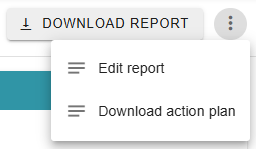
Click on the three dots to open the menu. Here you can then choose between editing the report and downloading the action plan. The latter is a pdf file in which all measures are listed with the corresponding ID and findings. This makes it easier for you to keep track of your measures locally, although AuditCloud also provides support here. More on this in the next step.