
The sidebar provides an overview of the navigation and system functions of AuditCloud. Please note: In the individual system, you can only view areas to which you have access according to your group. You can find out more about the groups under user management .
The classic “user” only has access to the dashboard, audit programs and measure processes in their system control.
The “Management summary” tile is generally only activated after authorization.
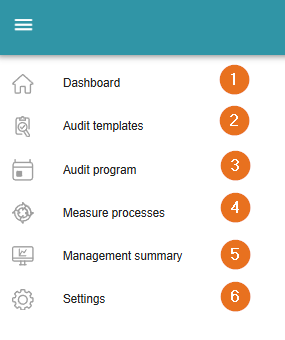
1 - Back to the dashboard
From anywhere: you can always return to the dashboard here.
2 - Audit templates
Users with the “Quality Manager” or “Administrator” group have access to the question lists. In this section, existing question lists can be edited and new question lists can be created.
3 - Audit program
Click on this button to access the audits previously recorded in the AuditCloud. Users with the “Auditor” or “Admin” group can create new audits here, just like in the dashboard. This can also be allowed to other groups.
4 - Measure processes
All action items created in the AuditCloud are collected in this section. Although users with the “Global Reader” group do not have write permissions, they can view all audits and measures by default. The measures can also be viewed by admins and the auditor.
5 - Management summary
Once the module has been commissioned, you can view various key figures and graphics here, which can be added as required.
6 - Settings
In the settings, admins can create new users or adapt existing users and maintain master data. Standards and norms can also be imported and viewed here. Further information on user administration can be found here: user management .